DYK (Did You Know) – Olfa Chenille Cutter

D.Y.K. – Did You Know?
About: Olfa Chenille Cutter

Olfa has answered all the problems that we as crafters have had with other chenille cutters. They really did listen to the challenge we had with other products for making chenille. In this post, I’ll explain what makes the Olfa Chenille Cutterdifferent, and why you shouldn’t be afraid to use it! Information in this post is a mixture of my personal experience using the cutter, and information sent to me by the Olfa company.

  • Feet
    • First, they added 4 different feet around the edge so that when you sew your fabric channels you can make them 1/8″, 1/4″, 3/8″, or 5/8” wide.
    • It helps to pick the foot that fits the tightest in the channel because then you don’t have to guide the cutter down the center of the channel when making your chenille, it will automatically go down the center since it fits tightly.
    • Once you have decided which foot to use turn the black knob (red arrow) to the left until the blade opens by the foot you want to use. The fabric you don’t want cut (your base) goes under the foot, and the fabric that you slide over the foot will be cut.
    space
  • Blade
    • The blade works much like a letter opener, in that the blade does not move as you cut, it stays stationary.
    • The blade is very sharp (thank goodness it has a carriage to protect our delicate hands) and you can cut a lot of fabric before it does get dull.
    • When it does become dull, you turn black knob to the right (where the black arrow is) until you hear a soft click. Now you will have a fresh section of blade to use.
    • The blade has a total of 24 cutting sections that can be used. This is an advantage over a regular rotary blade and cutter – if you get a dull spot on a rotary blade, the entire blade must be replaced. I think you will find that this method prolongs the life of the single blade.
    • When it is finally time to replace the blade, on the back of the tool there is a black clip you pull back. Put the new blade in – push the clip back into place and you are ready to go again.
space

space
See what I mean? They really did think of everything!
The rest of this week we are going to be showing some fun projects made with the chenille cutter – feel free to let me know about what types of things you have made with your own home-made chenille!

If you love the feel of chenille, be sure to check out our other ideas for making and sewing with your own custom chenille fabric:

Sheila Reinke, Heart of Sewing
Sheila

Janome Embroidery Machine

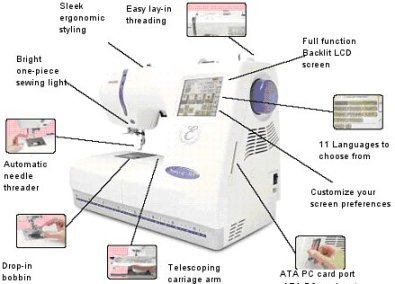
Today I’d like to tell you about a new embroidery sewing machine that I’ve been introduced to, the Janome Memory Craft 300E.

Janome Memory Craft

Features

  • PC Link – or offline ATA card
  • Upgradable via software on Janome’s website
  • Maximum Embroidery Field: 5.5″ x 7.9″ (140 x 200 mm)
  • .JEF Embroidery Format
  • 2 Hoops Included
    • A-Standard 5.0″x4.3″ (126 x 110 mm)
    • B-Large 5.5″x 7.9″ (140×200 mm)
  • Additional Hoops Available for purchase
    • C-Free Arm (2”x2”)
    • D-Giga Hoop (9.1”x 7.9”)
    • Hat Hoop Insert for A-Hoop
  • LCD Screen Grayscale 4.7″ with Backlight (94.5 x 74mm)
  • Customizeable Screen Preferences
  • Economy Mode: 1-30 min. or Off
  • Memory
    • Built in Memory – Embroidery
    • Outer Device: ATA Card (PC Design Card)
  • Bottom Storage Compartment
  • Wedge base-1 Piece Sewing Lights
  • Soft Cover Case
  • Embroidery Sewing Speed: 400-650 spm
  • Upper Thread Sensor
  • “P” foot Sensor
  • Semi-Automatic Thread Tension Control
  • 90 Built-In Designs: 10 Large, 60 Standard, 20 Combo
    • 3 Monogramming Fonts
    • 2 and 3 Letter Monogramming Emblems
  • 11 Programmed Languages
  • Edit Screen Capabilities
    • Design Combination
    • Drag and Drop for Design Position Adjustment
    • 90/100/110/120% Re-sizing (Design)
    • Flip (Vertical/Horizontal)
    • 45 Degrees Clockwise and Counter-Clockwise Rotation
    • Zoom Function
  • Ready To Sew Window
    • Embroidery Area Tracing
    • Favorite Thread Selection
    • Embroidery Time Indicator
    • Embroidery Stitch Counter Every 10 Stitches

Janome provides great project support on their website – with design ideas as well as free templates for their various embroidery machines. In a quick perusal of their site’s free templates, I found designs for specific holidays, seasonal designs, as well as just some cute and fun things (I have to admit, the ‘Stick Family’ was a bit of a surprise). Just go to their project center link, and click on Embroidery for the templates (you’ll have to select the machine you are working with, as not all machines can handle the same designs).

See what fun we had working with the new Janome? (I’m not in the picture – because I’m behind the camera!)Janome Fun
Here are a couple of the embroidery designs we tried out.
spaceNancy Berg – pictured on the right – came out from Janome to show us all how to use the new machine. She is an educator for Janome.
Nancy Berg

space
If you are thinking about starting to do machine embroidery, beware! I know it’s a popular trend right now, and it’s lots of fun to do (and allows for some real creativity in your creations); but it is very addictive. Don’t say I didn’t warn you! Wink

Sheila Reinke, Heart of Sewing

Features, Images and Product information posted with permission of Janome America.

Sheila

Sew Mini Sewing Machine

You may remember that I featured Kwik Sew Pattern #3596 on here a couple of weeks ago (see picture at left).

Well, I decided it was time to retire the Valentine apron, and make a new one for Spring. This week I am in Washington at one of the largest sewing expos in the country. We are featuring the Sew Mini Sewing Machine from Janome – so I thought my new detergent apron was a great time to try out the machine and get some photos of the stitching it produces.

Sew Mini
People will travel to this expo from all over the United States, and of course it has always been difficult to travel with a sewing machine. But because they are sewers, folks at this event are always looking for a sewing machine that they can carry with them. This Janome machine is very affordable, and is a great little machine to get you through a class, or to carry with you if you need to do some sewing while traveling. It only weighs 5 pounds, and takes up very little room, which makes it a great traveling companion!
I have also found this to be a wonderful machine to get a child to start sewing, being much less intimidating than a full-size machine would be.

Features on the Sew Mini

  • It is not a toy – it does work.
  • It does straight stitches and zig zag stitches.
  • Has a drop in bobbin.
  • Weighs approximately 5 lbs.
  • Tension adjustment.
  • Button to Reverse Stitch.
  • Uses regular needles.

Features you May Miss Having –

  • There is no light.
  • It is slower and is a little noisier than a regular machine.

However, to get someone new started sewing or for sewing when you are traveling it might just fit your needs.

Spring Apron Free Image Hosting at www.ImageShack.us
Here is a close-up of the stitching.
This was stitched through five layers of fabric.

Free Image Hosting at www.ImageShack.us
And here is a close-up of the back of the project.

And finally, my finished apron. It’s going to look great at the sink!
Sheila Reinke, Heart of Sewing
Sheila